
How To Trade At Binance? The Complete Beginner’s Guide
Last Updated on 16 February 2026 by CryptoTips.eu
Binance is currently one of the largest exchanges for digital currencies with over 300 million registered users worldwide. The platform has a very big offer, is suitable for beginner and experienced traders and supports over 400 cryptocurrencies.
In this guide we explain step by step how to create an account, deposit funds, execute a buy or sell order and how to withdraw. Everything you need to know to start trading at Binance in 2026. In our Binance review you will learn more about the exchange itself and in this tutorial we will focus on how the platform works.

Lifetime 20% friend discount on all fees + 25% BNB discount
How to register a Binance account
To use the exchange, an account is required. Registering takes only a few minutes and you can sign up with an email address or phone number. If you already have an account you can skip these steps.
- Go to the official Binance.com website
- Click on Sign Up at the top right
- Choose whether to register with your email address or phone number
- Create a strong, unique password that you don’t use anywhere else
- Referral ID: D10BZSYZ (you will receive a 20% discount on all fees for life)
- Agree to the Terms and Conditions and click Create account
- Complete the verification puzzle and confirm your email or phone number with the code you receive
Identity verification (KYC)
Binance requires all users to complete identity verification (KYC) before they can trade, deposit or withdraw funds. Without KYC you cannot access any trading features. The process usually takes between 5 and 30 minutes.
Here’s how to verify your account:
- Log in and click on your profile icon in the top right corner
- Select Verify
- Fill in your personal details: full name, date of birth and residential address (must match your ID document)
- Upload a photo of your government-issued ID (passport, driver’s license or national ID card)
- Complete the facial verification (liveness check) using your webcam or phone camera
- Wait for approval, this usually takes a few minutes but can take up to 24 hours
There are two KYC levels. Level 1 gives you basic access to trading and deposits. Level 2 increases your withdrawal and fiat deposit limits. For most users, Level 1 is sufficient to get started.
Security measures
When trading on the cryptocurrency market, security is top priority. This is not only the responsibility of the exchange, but also yours as a user. Binance offers multiple security features to protect your account, but you need to enable them yourself. By following the steps below, you will make it more difficult for hackers to access your account:
- Always log in via the official link: Binance.com and bookmark the page
- Enable Two-Factor Authentication (2FA) using Google Authenticator or SMS verification
- Set up an anti-phishing code in your security settings, so you can recognize real Binance emails
- Never give your password to anyone, not even the Binance helpdesk.
- Use a password for Binance that you have not used anywhere else yet
- Never use an ad from a search engine to go to Binance
Depositing funds
Binance supports over 35 fiat currencies including EUR, USD and AED with more than 30 different payment methods. You can deposit fiat currency directly to buy crypto or transfer cryptocurrency from another wallet.

The easiest way to deposit is by clicking the yellow Deposit button in the top navigation bar. This takes you directly to the deposit page where you can choose your currency and payment method.
Deposit fiat currency (EUR, USD, AED or other)
- Click the yellow Deposit button in the top navigation bar
- Select the fiat currency you want to deposit (for example EUR, USD or AED)
- Choose your preferred payment method. Available options depend on your region and currency:
- Bank transfer (SEPA for EUR, SWIFT for USD)
- Visa or Mastercard (credit/debit card)
- Apple Pay
- Google Pay
- Third-party payment providers (Wero and more)
- Enter the amount you want to deposit
- Follow the instructions to complete the payment
Some popular deposit fees to keep in mind:
- EUR via SEPA bank transfer: €1 flat fee
- EUR via SEPA Open Banking: 0.12%
- AED via bank transfer: free
- AED via online banking: 0.65%
- Credit/debit card (Visa/Mastercard): 2% fee
Once your deposit arrives, the funds appear in your Spot Wallet and you can start trading immediately.
Deposit cryptocurrency
If you already own crypto on another exchange or wallet, you can also deposit cryptocurrency directly:
- Click the yellow Deposit button in the top navigation bar
- Switch to the Crypto tab
- Search for the coin you want to deposit (for example BTC, ETH or a stablecoin)
- Select the correct network (for example ERC20 for Ethereum, BEP20 for BNB Chain, or the Bitcoin network for BTC)
- Copy the generated wallet address and use it as the receiving address in your external wallet or exchange
Important: always double-check the network you select. Sending crypto on the wrong network can result in permanent loss of funds. There is no fee for depositing cryptocurrency on Binance, only the network fee charged by the sending platform.
Start trading at Binance
In order to actually start trading at Binance, you need to have funds in your account. You can trade using fiat currency directly or use deposited crypto. Binance offers multiple trading modes including Spot, Cross Margin, Isolated Margin and Grid trading bots.
For this tutorial we focus on Spot trading, which is the most common way to buy and sell crypto:
- Go to the official Binance.com website
- Click on Trade in the top menu and select Spot
- The trading view will open with the following sections:
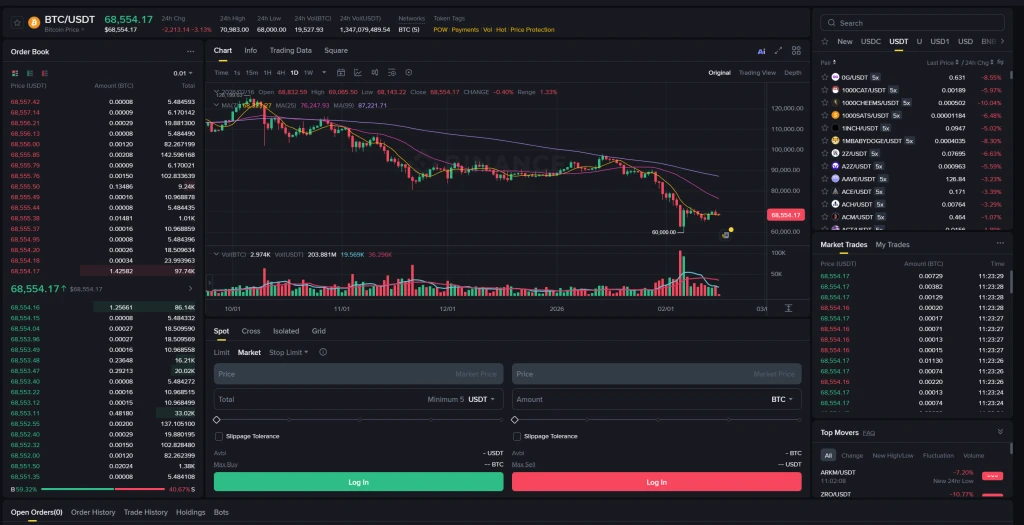
- Order Book (left): shows all current buy orders (green) and sell orders (red) with prices and amounts
- Price Chart (center): interactive chart with multiple timeframes (1 minute to 1 week), moving averages, volume indicators and TradingView integration
- Trading Pairs (top right): list of available pairs filtered by quote currency (USDT, USDC, BNB, USD1, FDUSD and more). Search for any coin by its ticker
- Buy/Sell Panel (bottom center): where you place your orders
- Market Trades (right): real-time feed of completed trades on the platform
- Open Orders (bottom): track your pending orders, order history, trade history and holdings
- Select or search a trading pair at the top right. The default view shows USDT pairs. If you deposited EUR, switch to the FDUSD or EUR tab, or simply use Convert to swap your EUR for USDT first.
- Choose your order type in the buy/sell panel. You’ll see tabs for:
- Limit: set your own price. The order executes only when the market reaches your price
- Market: buy or sell instantly at the current market price. This is the easiest option for beginners
- Stop Limit: set a trigger price and a limit price. Useful for stop-loss orders
- For a Market order: enter the total amount you want to spend (for example in USDT) or the amount of crypto you want to buy. You can also use the slider to invest a percentage of your available balance.
- Click Buy to execute your order
- For a Market order, your trade executes immediately and the coins appear in your Spot Wallet. For a Limit order, you’ll need to wait until the market reaches your set price.
- To sell your coins, use the Sell tab next to the Buy section. Enter the amount you want to sell and it will be exchanged back to your chosen quote currency.
Tip: if you’re new to trading and just want to swap one coin for another without using the order book, try Binance Convert. It lets you exchange over 400 cryptocurrencies instantly with zero fees and no slippage. You can find it under Trade > Convert.
Lifetime 20% friend discount on all fees + 25% BNB discount
Withdraw from Binance
When you’re ready to cash out, Binance lets you withdraw both fiat currency and cryptocurrency. Here’s how both options work.
Withdraw fiat currency (EUR, USD, AED or other)
- Click on your profile icon in the top right corner and go to Assets or Wallet
- Click on Withdraw
- Select Fiat and choose your currency (for example EUR, USD or AED)
- Choose the withdrawal method (SEPA for EUR, SWIFT for USD, bank transfer for AED)
- Enter your bank details and the amount you want to withdraw
- Review the details and complete the security verification (2FA)
- Depending on the method, the withdrawal takes anywhere from a few minutes to a few business days
Withdraw cryptocurrency
- Go to Assets or Wallet and click on Withdraw
- Select the cryptocurrency you want to withdraw (for example BTC)
- Enter the receiving wallet address from your external wallet or exchange
- Select the correct network (make sure it matches the receiving wallet)
- Enter the amount and click Submit
- Complete the security verification (2FA and email confirmation)
Tip: if you want to sell your crypto for EUR with low fees, you can withdraw your coins to a European exchange like Bitvavo and sell them there. SEPA transfers from Bitvavo to your bank account are fast and free.
Alternatively, you can sell your crypto directly on Binance using the Spot market or Convert feature, then withdraw the fiat to your bank account.
Binance fees overview
Binance has a competitive fee structure, especially for high-volume traders. Here’s a quick summary:
- Spot trading: 0.10% maker / 0.10% taker (base rate)
- Futures trading: 0.02% maker / 0.05% taker (base rate)
- BNB discount: pay fees with BNB token for a 25% discount
- Binance Convert: zero fees for instant swaps
- Crypto deposits: free
- Crypto withdrawals: varies per coin and network (for example BTC: 0.0002 BTC)
- Fiat deposits: varies by currency and method (SEPA €1, card 2%)
Fees decrease as you move up in VIP levels, which are based on your 30-day trading volume. You can check your current fee tier in your account settings.
After following the steps above you will know the basics of trading cryptocurrency on the Binance exchange. Whether you’re depositing EUR, USD, AED or any other supported currency, Binance makes it easy to get started. The trick is to do your own research before investing, start small and never invest more than you can afford to lose.
Investing in crypto involves significant risk. Past results do not guarantee future returns.
Good luck and please contact us if you have any questions.
Navigation

Gary Sheppard
26 September 2020 @ 23:22
When withdrawing from Binance to another wallet it asks if I want to save the address.
After submitting it says the following
please enter non-special characters within 4-20 digits
what does this mean?
CryptoTips.eu
27 September 2020 @ 10:35
Hi Gary,
This means that you may only use letters for your address name between 4-20 digits. So you can’t use numbers, hyphens etc.
Anita
10 March 2021 @ 16:15
Dear team,
Quick question, when looking at the pairing for a certain coin e.g. Ada/BTC x10, I assume this means 10 x leverage but what effect does this have on market trades? As in do I need to take this into consideration when buying and selling?
Thank you for your help in advance.
Anita
CryptoTips.eu
13 March 2021 @ 10:48
Nope, you will only use x10 when you select x10. The label only says that a x10 is possible, but you have to active it yourself.
Duc
29 April 2021 @ 23:58
How do I transfer BNB coins through safemoon?